

There’s a perfectly good television sitting in my spare room. It’s from around 2008, still works flawlessly, picture is fine, sound is fine. But every time someone mentions wanting to watch something, there’s this awkward pause. Because it’s dumb. Not broken — just dumb.
I almost bought a new TV twice. Both times I talked myself out of it, mostly because it felt wasteful. The thing turns on, it displays an image, what exactly is wrong with it?
Turns out, nothing. You just need a small piece of hardware between it and the modern world.
The Adapter Problem Nobody Really Explains Well
Here’s where most guides lose people. They assume you know what ports your TV has. A lot of people don’t, and honestly that’s fair — why would you memorize the back of your television?
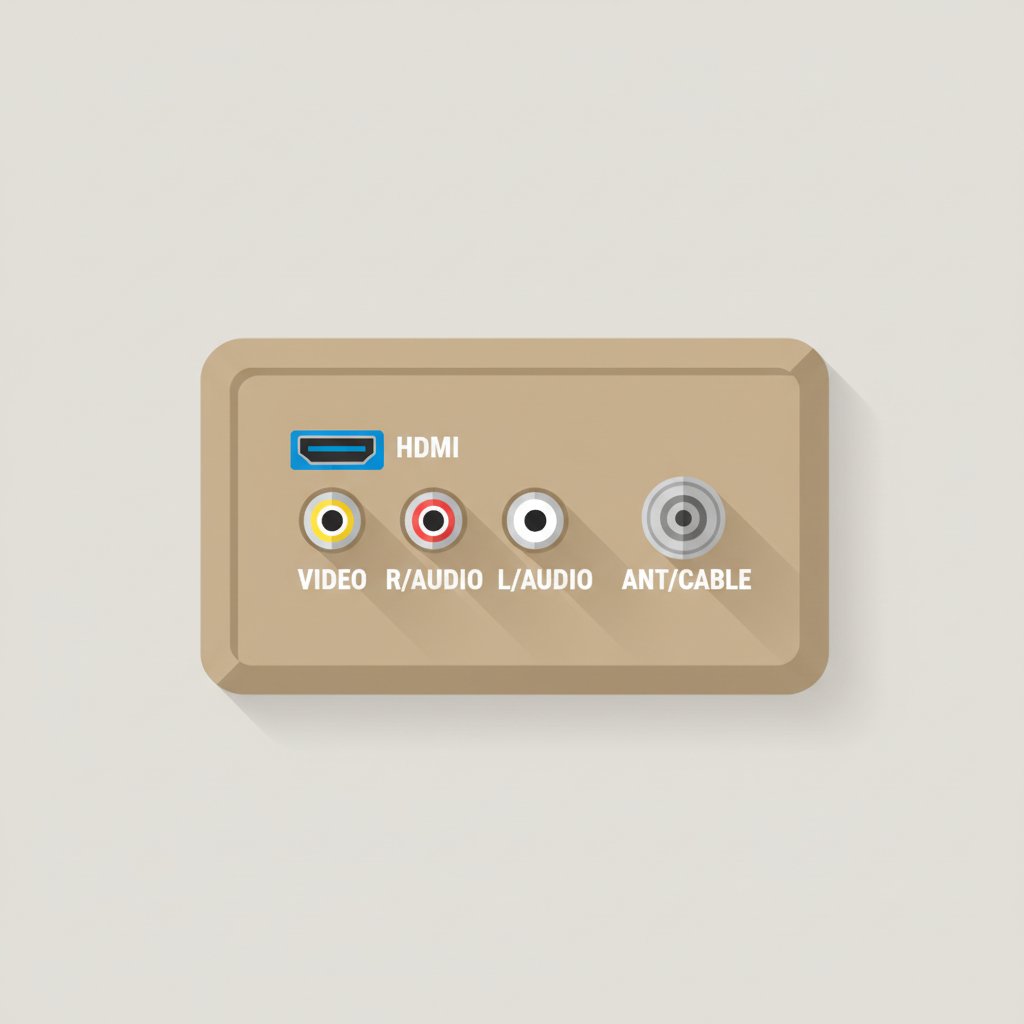
So before anything else, go look at the back of yours. What you’re trying to find:
HDMI port — that flat, slightly trapezoid-shaped port. If you have one, your life just got easier. Most TVs from around 2007 onward have at least one.
RCA inputs — those three colored round holes. Yellow (video), red and white (audio). Very common on anything from the late 90s through the mid-2000s.
Coaxial input — the single screw-in antenna connector. If this is the only thing on your TV, you’re dealing with something older, probably a CRT, and you’ll need an extra step.
If You Have HDMI
You’re essentially done with the hard part. Any modern streaming stick plugs straight in. The Roku Express runs around $25, and it works. The Onn 4K Pro (about $50) honestly gives you more than you’d expect at that price — built-in ethernet port, voice control, surprisingly snappy. Pick whatever fits your budget, plug it in, connect to Wi-Fi, done.
The one thing people miss: the USB power cable. Some older TVs have USB ports that only push 500mA of power, which isn’t quite enough. If your stick keeps rebooting or acting strange, plug the power cable into a wall outlet instead. That usually fixes it immediately.
If You Only Have RCA Inputs
This requires one extra piece — an HDMI to RCA converter. They cost anywhere from $3 to $15, and the price difference mostly comes down to build quality and whether they need separate power (most do — USB powered, plug into any phone charger).
The converter sits between the streaming stick and the TV. Stick → converter → RCA cables → TV.
It works. The picture won’t be 4K, obviously. Your TV isn’t 4K. But it’ll be watchable, and honestly for a spare room or a kitchen TV, that’s completely fine.
The Really Old CRT Situation
If your TV only has a coaxial input — the screw-in kind — you need one more step on top of the RCA converter. An RF modulator takes the RCA signal and turns it into something the coaxial port understands. The TV then receives it as a signal on Channel 3 or 4.
Yes, it’s a bit convoluted. Yes, it still works. The picture quality is going to be what it is, but the point is that a TV from 1987 can technically run a Roku. Which is kind of absurd and kind of great.
Using a Laptop Instead
Some people already have a laptop they barely use, and honestly this is an underrated option. A simple HDMI cable from laptop to TV turns the TV into a monitor. VGA works too if that’s what you’re working with, though you’ll need a separate audio cable since VGA doesn’t carry sound.
The main frustration most people hit: they close the laptop lid and everything goes dark.
Go into your power settings and change what happens when you close the lid. Set it to “Do Nothing.” Then set your display to output only to the TV. Now the laptop sits closed somewhere out of the way and the TV is the screen.
I used this setup for almost a year before I got a proper streaming stick. It’s clunkier, but it works completely fine.
Security Stuff (Worth Mentioning Once)
Streaming sticks run small operating systems — usually Android-based or Linux-based — and they connect to your home network. Not a huge deal, but worth putting them on a guest network if your router supports it. Keeps them separate from your laptop or phone.
Also, these devices track quite a bit by default. Somewhere in the settings, there’s usually an option to disable the advertising ID and limit data sharing. It takes two minutes and it’s worth doing.
Firmware updates matter too. I know nobody enjoys updating firmware. Do it anyway.
What Things Actually Cost
If you’re running the numbers:
A basic streaming stick to plug into an HDMI port runs $20–$30. An HDMI to RCA converter adds maybe $8–$12. If you need the RF modulator on top of that, another $15–$25. A Wi-Fi to ethernet bridge for a TV that’s wired but not wireless — the TP-Link ones hover around $34 and work well.
The high end of this whole setup, even for a very old TV with no HDMI and only coaxial input, probably costs you $50–$60 total. Versus a new TV at $300 minimum.
The TV in my spare room is still there. Still running. Someone watched three hours of home improvement content on it last weekend without a single complaint.
It just needed a $10 adapter and a little patience.